一个将博客和个人知识库结合的思路

基于hexo+icarus博客,利用Obsidian和自写脚本实现博客和个人知识库的结合

灵机一动

笔者久仰Obsidian大名,但是此前都是用typora写的博客文章。这两天心血来潮想试试Obsidian(听闻有内部链接什么的新奇功能),加上想搞个个人知识库放一些杂七杂八的笔记什么的(没必要发布的),所以开始了本次折腾

准备工作

主要的问题实际上是博客文章和知识库文章的管理,这首先就牵扯到文章图片附件的问题(笔者博客图片一并部署到github了),知识库的图片不好公开,所以要和博客的图片分开存储,好在Obsidian有丰富的插件,利用插件”Attachment Management“可以为不同文件夹设置不同的附件存放路径,结合hexo的exclude配置可以实现博客与知识库的分离(即知识库不部署不公开)。
接下来的问题是知识库文章和博客文章的转化,笔者将博客文章视作知识库文章的一部分,因此准确来说是知识库文章部署到博客的问题。目前考虑到的部署中的问题是内部链接的去除和图片路径的转换,需要写脚本解决。

开始动手

附件设置

  1. 安装并启用插件。这一步网上有很多教程了,属于Obsidian的使用,就不废话了。贴上一个链接:如何安装插件?玩转Obsidian的保姆级教程
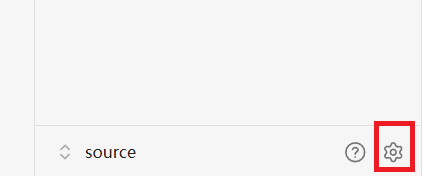
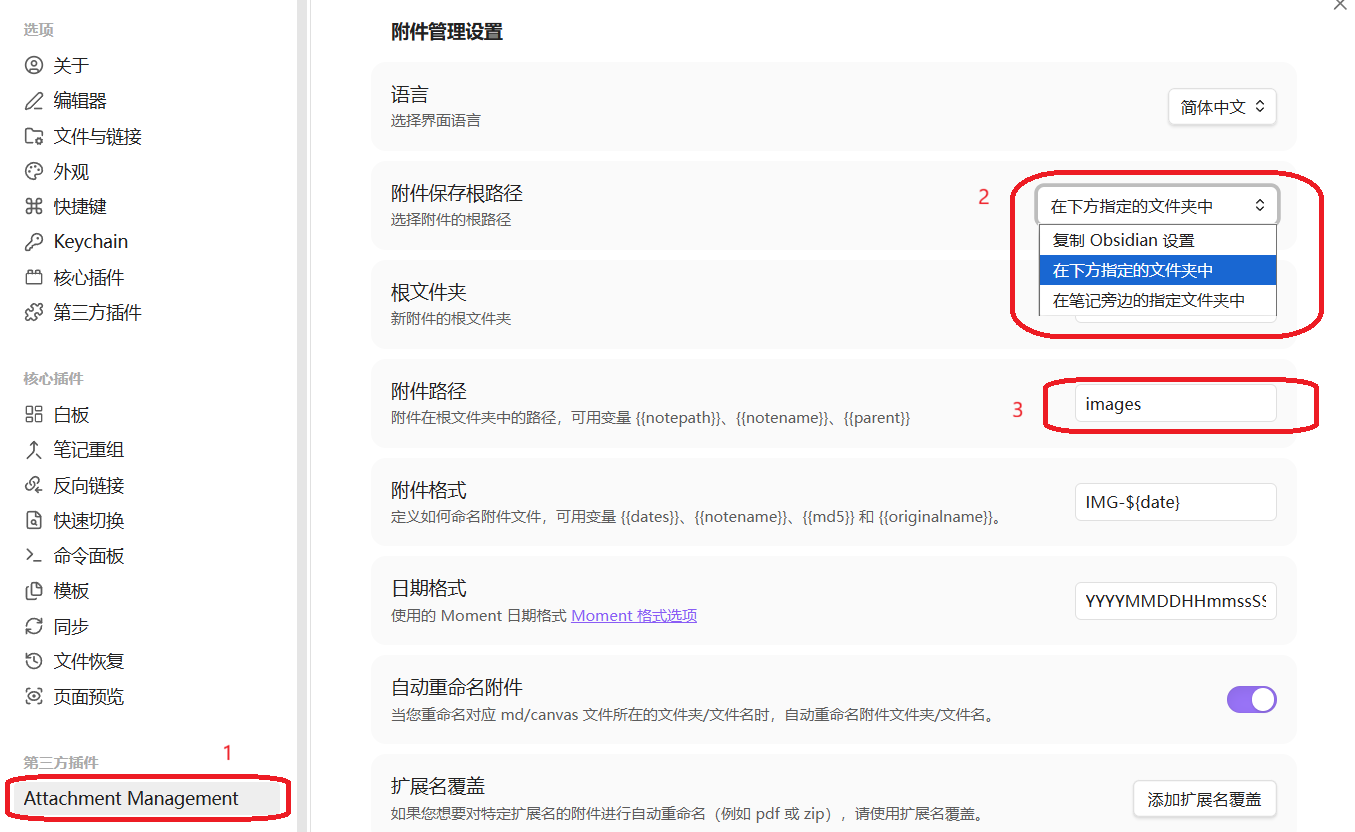
  2. 安装启用完“Attachment Management”后,点击Obsian左侧工具栏右下角的设置图标展开设置,进行附件默认路径的设置。笔者直接用Obsidian打开的hexo下的source文件夹,所以附件默认路径设置中,根文件夹留空,附件路径填images(即博客图片目录。填知识库图片目录也行,此处只是保证Obsidian不会胡乱建文件夹来放图片而已,图片目录的设置主要在下一步)
    展开设置
    设置默认路径
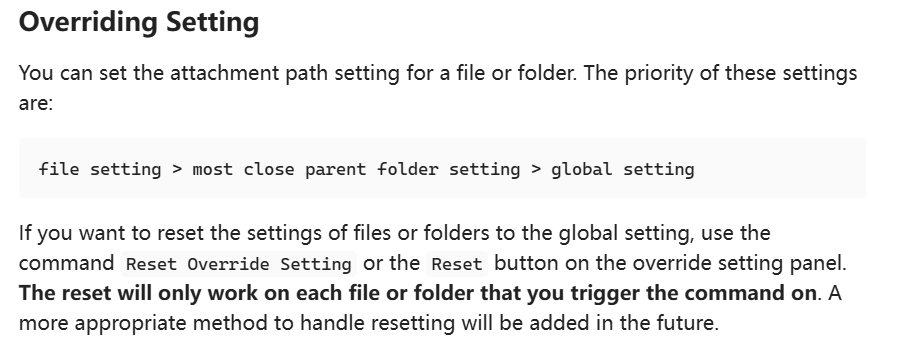
  3. Attachment Management的介绍中提到了可以为文件夹单独重载附件路径:
    重载附件路径的特性
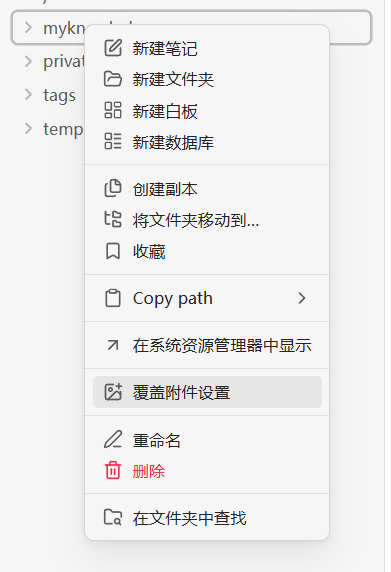
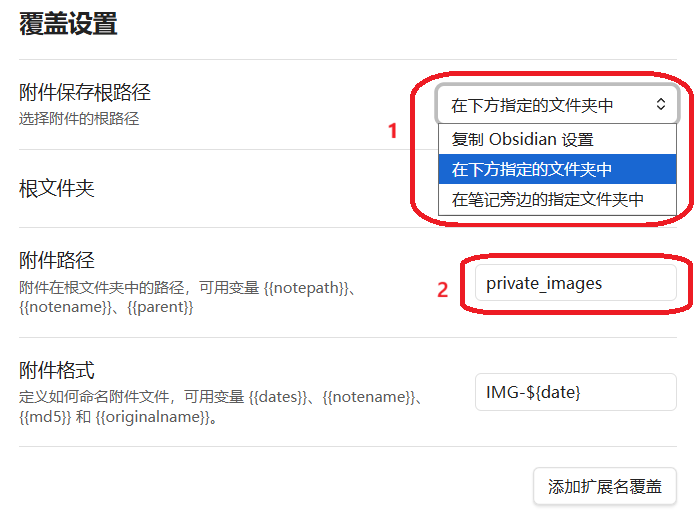
    所以,笔者在source目录下新建了两个文件夹“myknowledge”和“private_images”作为知识库文件夹及其附件文件夹。选中“myknowledge”文件夹,右键可以看到“覆盖附件设置”的选项,在这里可以为文件夹单独设置附件路径
    覆盖附件设置的选项
    此处的设置和默认路径设置很相似,根文件夹也是留空,附件路径设为private_images
    覆盖知识库附件设置
    然后再对post文件夹如法炮制即可(根文件夹留空,附件路径设为images)
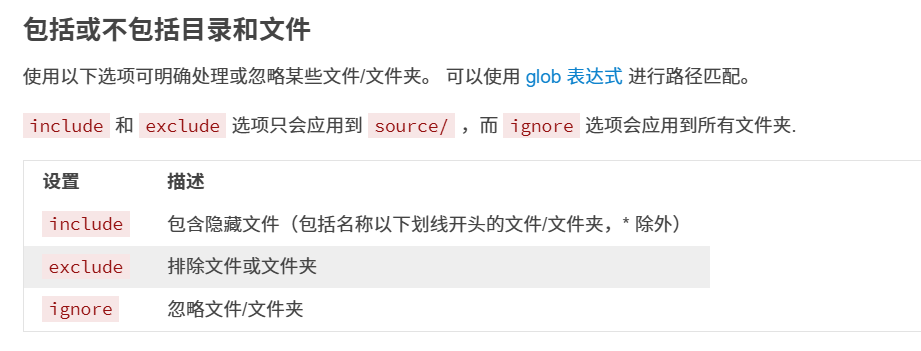
  4. 这时候还没结束,因为除了draft文件夹,hexo默认会把source下的所有文件都生成到public(即部署的文件夹)中,此时就需要借助hexo的exclude配置来排除知识库文件夹及其附件文件夹
    exclude配置的官方描述
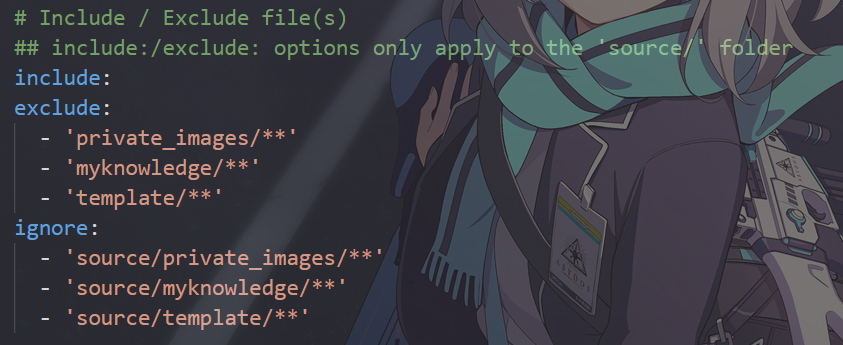
    打开config.yml,找到如下位置,将知识库文件夹及其附件文件夹填入(此处保险起见exclude和ignore全填了,需要注意的是exclude和ignore的相对根目录不同,前者以source为根目录,后者以hexo根目录为根目录。** 表示所有文件)
    config.yml的配置
    到此,博客和知识库的附件存储路径就分开了

知识库文章发布到博客的脚本

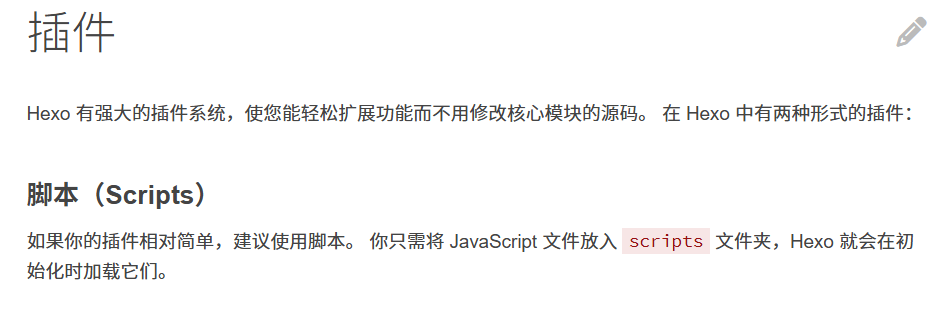
hexo为用户提供了使用自定义脚本来管理博客的途径:
hexo对脚本的支持
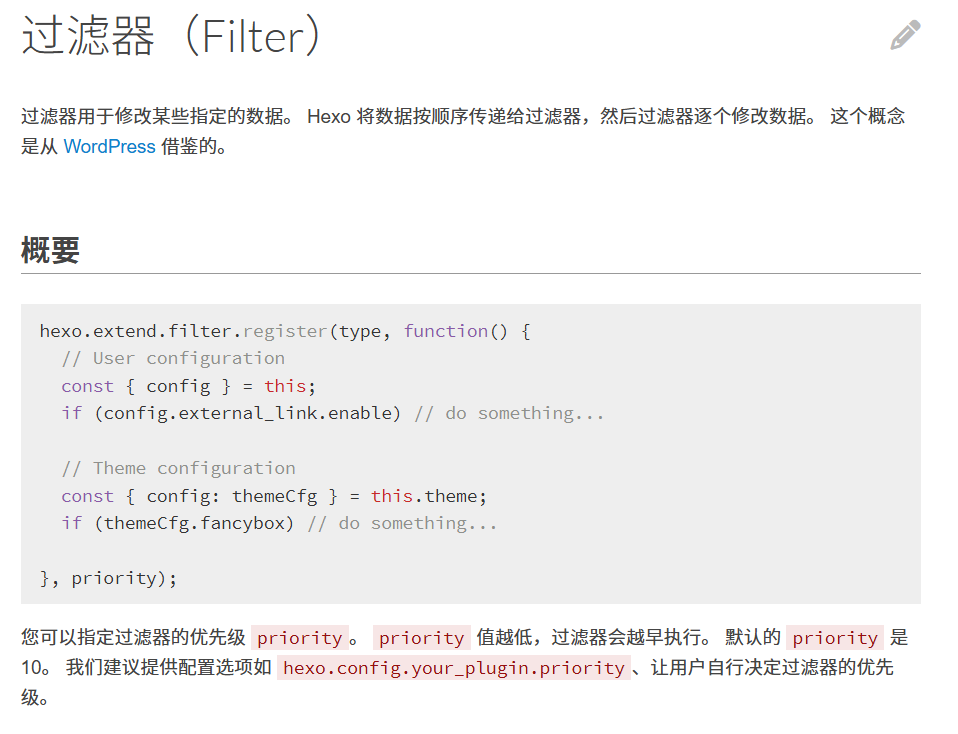
所以,自定义脚本只需要放到hexo根目录的scripts文件夹里即可生效。当然,自定义脚本肯定需要用到hexo的API,此处主要是使用了hexo的过滤器,一个hexo.extend.filter.register()函数即可
hexo.extend.filter.register的官方描述
脚本总体思路:设置一个FrontMatter字段published,ture表示需要部署,false表示不需要部署,通过遍历myknowledge的md文件,挨个查看published字段来判断是否进行发布操作。对于标记为需要发布的文章,先去掉内部链接,同时转换图片路径,然后检查文章是否已经存在,是否需要更新。

  1. 函数依赖。脚本涉及文件操作,路径操作,还有FrontMatter解析操作,所以需要使用到fs-extra、path、js-yaml这三个模块。在hexo根目录下打开命令行,运行如下命令安装这三个模块
1
npm install fs-extra path js-yaml --save
  1. 编写解析文章的函数,分离出FrontMatter和正文。使用参数article传入文章内容,通过js字符串的正则匹配方法match来获得FrontMatter的内容,然后分离article的FrontMatter和正文,返回一个拆分出来的对象
1
2
3
4
5
6
7
8
9
10
11
12
13
14
// 解析文章,分离Front Matter和正文,用于获取published来判断是否需要发布
function parseArticle(article){
    const match = article.match(/^---\n([\s\S]*?)\n---/);
    if (match) {
        try{
            const frontMatter = yaml.load(match[1]);
            const body = article.slice(match[0].length).trim();
            return {frontMatter,body}
        } catch (error) {
            console.warn('Front Matter parse failed')
        }
    }
    return { frontMatter: {}, body: article }
}
  1. 编写去除内部链接和修改图片路径的函数。使用三个参数content、filePath、knowledgeDir,分别传入文章内容、文章路径、知识库路径。首先通过正则匹配去除掉文章内容里的内部链接,然后根据传入的文件路径和知识库路径计算出相对路径,修改图片的路径(此处只是先修改路径,后续会有复制操作),返回处理完的文本
1
2
3
4
5
6
7
8
9
10
11
12
13
14
15
16
17
18
19
20
21
22
// 去除文章内部链接和改变图片路径
function convertContent(content, filePath, knowledgeDir){
    let result = content;

    // 去除内部链接,wiki格式
    result = result.replace(/\[\[.*?\]\]/g, '');
    // 去除内部链接,md超链接格式
     result = result.replace(/\[.*?\]\(.*?\.md\)/g, '');

    // 计算相对路径
    const relativePath = path.relative(knowledgeDir, path.dirname(filePath));
    const depth = relativePath.split(path.sep).filter(Boolean).length;
    const upDir = depth > 0 ? '../'.repeat(depth) + '../' : '../';
   
    // 转换图片路径:../myknowledge/images/xxx.png → ../images/xxx.png
    result = result.replace(
        new RegExp(`!\\[(.*?)\\]\\(${upDir}private_images/(.*?)\\)`, 'g'),
        '![$1](../images/$2)'
    );

    return result;
}
  1. 编写提取图片文件名的函数。使用参数content传入文章正文内容,通过正则表达式匹配出图片链接,提取出所有图片的名字,返回图片名数组
1
2
3
4
5
6
7
8
9
10
11
// 提取图片文件名
function extractImageName(content){
    const matches = [];
    const regex = /!\[.*?\]\(\.\.\/images\/(.*?)\)/g;
    let match;

    while((match = regex.exec(content)) !== null){
        matches.push(match[1]);
    }
    return [...new Set(matches)];// 去重
}
  1. 整合上述函数,编写处理单个文章的函数。使用五个参数filePath、knowledgeDir、postDir、knowledgeImagesDir、blogImagesDir,传入文章路径、知识库路径、博客路径、知识库附件路径、博客附件路径。先用fs模块读取文件所有内容,然后使用parseArticle()解析出文章的FrontMatter和正文,检查published字段判断是否需要进行发布操作,若不需要,返回false;若需要发布,则接着去除内部链接,修改图片路径,重新构建出文本。然后由filePath和postDir构建出文章在post下的路径,判断文章是否已经存在,是否需要更新。若文章不存在或者需要更新,则接着进行图片的复制操作:先提取图片文件名,然后将图片从private_images复制到images(此处设置了overwrite: ture来防止同一图片累积)。最后就是写入重新构建的文本。本函数返回布尔值,记录文章是否更新,以便计数
1
2
3
4
5
6
7
8
9
10
11
12
13
14
15
16
17
18
19
20
21
22
23
24
25
26
27
28
29
30
31
32
33
34
35
36
37
38
39
40
41
42
43
44
45
46
47
48
49
50
51
52
53
54
55
56
57
// 处理单个文章
async function ProcessSingleArticle(filePath, knowledgeDir, postsDir, knowledgeImagesDir, blogImagesDir){
  // 读取文章
  //console.log(`processing ${filePath}`);
  const content = await fs.readFile(filePath, 'utf8');
  const { frontMatter, body } = parseArticle(content);
  //console.log('ispublished:'+frontMatter.published);
 
  // 检查是否需要发布
  if (frontMatter.published !== true) {
    return false;
  }

  // 转换内容(去掉内部链接,转换图片路径)
  let processed = convertContent(body, filePath, knowledgeDir);

  // 构建完整内容
  const finalContent = `---\n${yaml.dump(frontMatter)}---\n\n${processed}`;

  // 目标文件路径(保留原文件名)
  const fileName = path.basename(filePath);
  const targetPath = path.join(postsDir, fileName);

  // 检查是否需要更新(比较内容)
  let needsUpdate = true;
 
  if (await fs.pathExists(targetPath)) {
    const existing = await fs.readFile(targetPath, 'utf8');
    if (existing === finalContent) {
      needsUpdate = false;
    }
  }

  // 如果需要更新
  //console.log("needUpdate:"+needsUpdate);
  if (needsUpdate) {
    console.log(`[+] updating: ${fileName}`);

    // 复制文章引用的图片
    const usedImages = extractImageName(processed);

    for (const imgName of usedImages) {
      const sourceImg = path.join(knowledgeImagesDir, imgName);
      const targetImg = path.join(blogImagesDir, imgName);
      if (await fs.pathExists(sourceImg)) {
        await fs.copy(sourceImg, targetImg, { overwrite: true });
        console.log(`[+] copied picture: ${imgName}`);
      }
    }

    // 写入文章
    await fs.writeFile(targetPath, finalContent);
    console.log(`[+] updated ${fileName} successfully`);
  }

  return needsUpdate;
}
  1. 编写遍历md文件的函数。使用参数dir用来传入知识库所在路径,递归读取路径下所有的md文件,写入数组fileList,最后返回fileList
1
2
3
4
5
6
7
8
9
10
11
12
13
14
15
16
17
// 获取所有md文件
async function getAllMdFiles(dir){
let fileList = [];
    const items = await fs.readdir(dir, { withFileTypes: true });

    for (const item of items) {
        const fullPath = path.join(dir, item.name);

        if (item.isDirectory() && item.name !== 'images') {
            await getAllMdFiles(fullPath, fileList);
        } else if (item.isFile() && item.name.endsWith('.md')) {
            fileList.push(fullPath);
        }
    }

    return fileList;
}
  1. 整合上述内容,使用API注册自定义过滤规则。第一个参数type表示过滤器执行的时机,此处使用“after_init”,即在博客初始化之后,开始执行内部过滤器之前;第二个参数使用一个匿名函数,将获取所有md文件以及处理单个文章整合起来;第三个参数是优先级,此处不用设置,因为第一个参数已经保证此处自写的过滤器可以先于内置过滤器生效了(实际上笔者测试发现第一个参数为“before_generate”时,设置优先级似乎不能让自写的过滤器先于内置过滤器生效,需要两次hexo g才能让知识库文章真正生成到public文件夹内,所以在DS的建议下将第一个参数设为“after_init”,舍弃优先级的使用)
1
2
3
4
5
6
7
8
9
10
11
12
13
14
15
16
17
18
19
20
21
22
23
24
25
26
27
28
29
30
31
32
33
34
35
36
37
38
39
40
41
// 总函数,注册回调函数自实现过滤规则
hexo.extend.filter.register('after_init', async function(){
    const sourceDir = hexo.source_dir;
    const knowledgeDir = path.join(sourceDir, 'myknowledge');
    const postsDir = path.join(sourceDir, '_posts');
    const knowledgeImagesDir = path.join(sourceDir, 'private_images');
    const blogImagesDir = path.join(sourceDir, 'images');
    console.log('[+] syncing articles in myknowledge...');

    // 确保目录存在
    await fs.ensureDir(postsDir);
    await fs.ensureDir(blogImagesDir);

    // 遍历知识库目录
    console.log("[+] getting all mdfiles");
    const files = await getAllMdFiles(knowledgeDir);
    let updatedCount = 0;

    console.log("[+] try to process articles");
    for(const file of files){
        try{
            const updated = await ProcessSingleArticle(
                file,
                knowledgeDir,
                postsDir,
                knowledgeImagesDir,
                blogImagesDir
            );

            if(updated){
                updatedCount++;
            }
        } catch(error){
            console.error(`process failed ${file}:`,error.message);
        }
    }
    console.log("[+] sync successfully")
    if(updatedCount > 0){
        console.log(`[+] updated ${updatedCount} articles`)
    }
});

最终脚本:

1
2
3
4
5
6
7
8
9
10
11
12
13
14
15
16
17
18
19
20
21
22
23
24
25
26
27
28
29
30
31
32
33
34
35
36
37
38
39
40
41
42
43
44
45
46
47
48
49
50
51
52
53
54
55
56
57
58
59
60
61
62
63
64
65
66
67
68
69
70
71
72
73
74
75
76
77
78
79
80
81
82
83
84
85
86
87
88
89
90
91
92
93
94
95
96
97
98
99
100
101
102
103
104
105
106
107
108
109
110
111
112
113
114
115
116
117
118
119
120
121
122
123
124
125
126
127
128
129
130
131
132
133
134
135
136
137
138
139
140
141
142
143
144
145
146
147
148
149
150
151
152
153
154
155
156
157
158
159
160
161
162
163
164
165
166
167
168
169
170
171
const fs=require('fs-extra')
const path=require('path')
const yaml=require('js-yaml')

// 解析文章,分离Front Matter和正文,用于获取published来判断是否需要发布
function parseArticle(article){
    const match = article.match(/^---\n([\s\S]*?)\n---/);
    if (match) {
        try{
            const frontMatter = yaml.load(match[1]);
            const body = article.slice(match[0].length).trim();
            return {frontMatter,body}
        } catch (error) {
            console.warn('Front Matter parse failed')
        }
    }
    return { frontMatter: {}, body: article }
}

// 去除文章内部链接和改变图片路径
function convertContent(content, filePath, knowledgeDir){
    let result = content;

    // 去除内部链接,wiki格式
    result = result.replace(/\[\[.*?\]\]/g, '');
    // 去除内部链接,md超链接格式
     result = result.replace(/\[.*?\]\(.*?\.md\)/g, '');

    // 计算相对路径
    const relativePath = path.relative(knowledgeDir, path.dirname(filePath));
    const depth = relativePath.split(path.sep).filter(Boolean).length;
    const upDir = depth > 0 ? '../'.repeat(depth) + '../' : '../';
   
    // 转换图片路径:../myknowledge/images/xxx.png → ../images/xxx.png
    result = result.replace(
        new RegExp(`!\\[(.*?)\\]\\(${upDir}private_images/(.*?)\\)`, 'g'),
        '![$1](../images/$2)'
    );

    return result;
}

// 提取图片文件名
function extractImageName(content){
    const matches = [];
    const regex = /!\[.*?\]\(\.\.\/images\/(.*?)\)/g;
    let match;

    while((match = regex.exec(content)) !== null){
        matches.push(match[1]);
    }
    return [...new Set(matches)];// 去重
}

// 处理单个文章
async function ProcessSingleArticle(filePath, knowledgeDir, postsDir, knowledgeImagesDir, blogImagesDir){
  // 读取文章
  //console.log(`processing ${filePath}`);
  const content = await fs.readFile(filePath, 'utf8');
  const { frontMatter, body } = parseArticle(content);
  //console.log('ispublished:'+frontMatter.published);
 
  // 检查是否需要发布
  if (frontMatter.published !== true) {
    return false;
  }

  // 转换内容(去掉内部链接,转换图片路径)
  let processed = convertContent(body, filePath, knowledgeDir);

  // 构建完整内容
  const finalContent = `---\n${yaml.dump(frontMatter)}---\n${processed}`;

  // 目标文件路径(保留原文件名)
  const fileName = path.basename(filePath);
  const targetPath = path.join(postsDir, fileName);

  // 检查是否需要更新(比较内容)
  let needsUpdate = true;
 
  if (await fs.pathExists(targetPath)) {
    const existing = await fs.readFile(targetPath, 'utf8');
    if (existing === finalContent) {
      needsUpdate = false;
    }
  }

  // 如果需要更新
  //console.log("needUpdate:"+needsUpdate);
  if (needsUpdate) {
    console.log(`[+] updating: ${fileName}`);

    // 复制文章引用的图片
    const usedImages = extractImageName(processed);

    for (const imgName of usedImages) {
      const sourceImg = path.join(knowledgeImagesDir, imgName);
      const targetImg = path.join(blogImagesDir, imgName);
      if (await fs.pathExists(sourceImg)) {
        await fs.copy(sourceImg, targetImg, { overwrite: true });
        console.log(`[+] copied picture: ${imgName}`);
      }
    }

    // 写入文章
    await fs.writeFile(targetPath, finalContent);
    console.log(`[+] updated ${fileName} successfully`);
  }

  return needsUpdate;
}

// 获取所有md文件
async function getAllMdFiles(dir){
let fileList = [];
    const items = await fs.readdir(dir, { withFileTypes: true });

    for (const item of items) {
        const fullPath = path.join(dir, item.name);

        if (item.isDirectory() && item.name !== 'images') {
            await getAllMdFiles(fullPath, fileList);
        } else if (item.isFile() && item.name.endsWith('.md')) {
            fileList.push(fullPath);
        }
    }

    return fileList;
}

// 总函数,注册回调函数自实现过滤规则
hexo.extend.filter.register('after_init', async function(){
    const sourceDir = hexo.source_dir;
    const knowledgeDir = path.join(sourceDir, 'myknowledge');
    const postsDir = path.join(sourceDir, '_posts');
    const knowledgeImagesDir = path.join(sourceDir, 'private_images');
    const blogImagesDir = path.join(sourceDir, 'images');
    console.log('[+] syncing articles in myknowledge...');

    // 确保目录存在
    await fs.ensureDir(postsDir);
    await fs.ensureDir(blogImagesDir);

    // 遍历知识库目录
    console.log("[+] getting all mdfiles");
    const files = await getAllMdFiles(knowledgeDir);
    let updatedCount = 0;

    console.log("[+] try to process articles");
    for(const file of files){
        try{
            const updated = await ProcessSingleArticle(
                file,
                knowledgeDir,
                postsDir,
                knowledgeImagesDir,
                blogImagesDir
            );

            if(updated){
                updatedCount++;
            }
        } catch(error){
            console.error(`process failed ${file}:`,error.message);
        }
    }
    console.log("[+] sync successfully")
    if(updatedCount > 0){
        console.log(`[+] updated ${updatedCount} articles`)
    }
});

效果展示

以本文和另一篇测试文章为例,本文设置published为true,测试文章设置为false。还未进行generate之前,两篇文章中的图片链接如下:
本文图片链接
测试文章图片链接
本文中设置一个内部链接:
内部链接
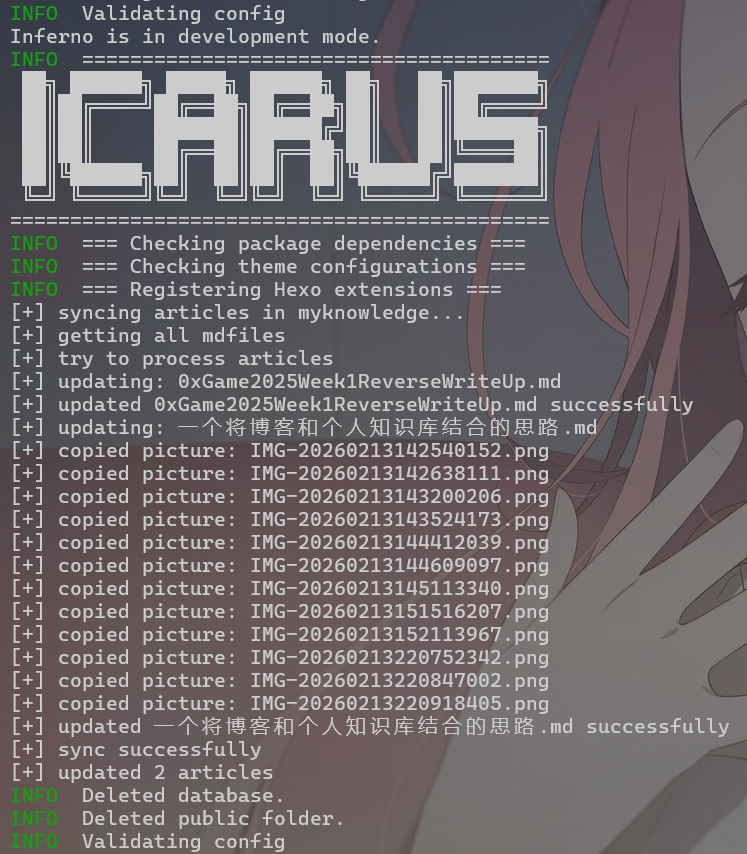
然后执行hexo cl && hexo g:
命令行输出
查看发布到post的文章中内部链接是否删除,图片链接是否修改:
发布到post的文章中的内部链接
发布到post的文章中的图片链接
可以看到,脚本成功生效

作者

SydzI

发布于

2026-02-13

更新于

2026-02-15

许可协议

评论