记一次blog优化
Hexo+NexT博客的小优化 (注:此篇记录的是笔者原来崩溃的博客的优化,是旧版NexT优化)
- 这几天突然产生一个想法:博客主页改成分类的样式会不会更好看一点,主页是主题集合,每个主题里面才是相关的文章
- 心动不如行动,直接开干!
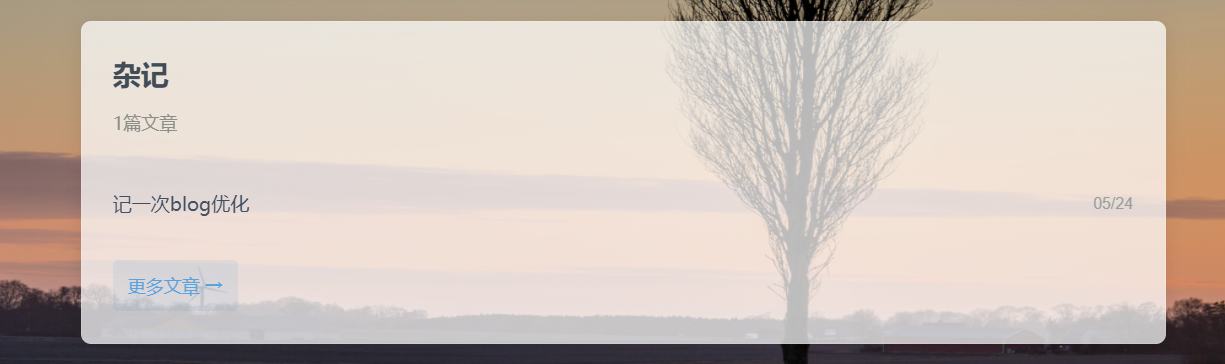
首页分类卡片实现
这部分其实花了不少时间,因为没有具体学过Hexo+NexT的结构,好在有Deepseek老师的帮助
修改的部分主要在themes/next/layout/index.swig,下面直接贴代码:
1
2
3
4
5
6
7
8
9
10
11
12
13
14
15
16
17
18
19
20
21
22
23
24
25
26
27
28
29
30
31
32
33
34
35
36
37
38
39
40
41
42
43
44
45
46
47
48
49
50
51
52
53
54
55
56
57
58
59
60
61
62
{% extends '_layout.swig' %}
{% import '_macro/sidebar.swig' as sidebar_template with context %}
{% block title %}{{ title }}{%- if theme.index_with_subtitle and subtitle %} - {{ subtitle }}{%- endif %}{% endblock %}
{% block class %}index categories-page{% endblock %}
{% block content %}
{# 这部分是实现category卡片,最后面还有没category的文章的处理,因为我严格了每篇文章有category,就没管画面如何了 #}
{% if site.categories.length > 0 %}
<div class="category-cards-container">
{% for cat in site.categories.toArray() %}
<div class="category-card">
<div class="category-header">
<h2 class="category-name">{{ cat.name }}</h2>
<span class="post-count">{{ cat.posts.length }}篇文章</span>
</a>
</div>
{# 这一部分实现卡片显示包含的文章的标题,数量可以改下面的limit()的数字 #}
<div class="recent-posts-list">
{% for post in cat.posts.sort('date', -1).limit(3).toArray() %}
<div class="recent-post-item">
<a href="{{ url_for(post.path) }}" class="post-title" title="{{ post.title }}">
{{ post.title | truncate(18) }}
</a>
<span class="post-date">
{% if post.updated %}
{{ post.updated.format('MM/DD') }}
{% else %}
{{ post.date.format('MM/DD') }}
{% endif %}
</span>
</div>
{% endfor %}
<div class="more-posts-wrapper">
<a href="{{ url_for('/categories/' + cat.name + '/') }}" class="more-posts-button">
更多文章 →
</a>
</div>
</div>
</div>
{% endfor %}
</div>
{% else %}
<div class="no-categories-notice">
<p>暂无分类数据,请为文章添加分类</p>
</div>
{% endif %}
{% endblock %}
{% block sidebar %}
{{ sidebar_template.render(false) }}
{% endblock %}还有source/_data/styles.styl
1
2
3
4
5
6
7
8
9
10
11
12
13
14
15
16
17
18
19
20
21
22
23
24
25
26
27
28
29
30
31
32
33
34
35
36
37
38
39
40
41
42
43
44
45
46
47
48
49
50
51
52
53
54
55
56
57
58
59
60
61
62
63
64
65
66
67
68
69
70
71
72
73
74
75
76
77
78
79
80
81
82
83
84
85
86
87
88
89
90
91
92
93
94
95
96
97
98
99
100
101
102
103
104
105
106
107
108
109
110
111
112
113
114
115
116
117
118
119
120
121
122
123
124
125
126
127
128
129
130
131
132
133
134
135
136
137
138
139
140
141
142
143
144
145
146
147
148
149
150
151
152
/* 分类卡片样式 - 安全追加 */
.category-cards-container {
margin: 40px auto;
max-width: 1200px;
padding: 0 20px;
.category-card {
background: rgba(255,255,255,0.85); /* 半透明白色,与你的opacity 0.85协调 */
border-radius: 8px;
box-shadow: 0 2px 15px rgba(0,0,0,0.1);
margin-bottom: 25px;
padding: 25px;
transition: all 0.3s ease;
backdrop-filter: blur(2px); /* 毛玻璃效果增强背景融合 */
border: 1px solid rgba(255,255,255,0.3); /* 柔和边框 */
&:hover {
transform: translateY(-5px);
box-shadow: 0 5px 25px rgba(0,0,0,0.15);
}
.category-name {
color: #2c3e50;
font-size: 1.4em;
margin: 0 0 8px 0;
font-weight: 600;
}
.post-count {
color: #7f8c8d;
font-size: 0.9em;
display: block;
}
}
}
/* 这部分是我自己用的背景图的设置 */
body {
background-image: url(/images/background.jpg);
background-repeat: no-repeat;
background-attachment: fixed;
background-size: 100% 100%;
opacity: 0.85;
}
/* ======================== */
/* 分类卡片内的文章列表样式 */
/* ======================== */
.category-card {
position: relative; /* 为毛玻璃效果提供定位上下文 */
.category-header {
margin-bottom: 15px;
padding-bottom: 12px;
border-bottom: 1px solid rgba(0,0,0,0.08);
}
.recent-posts-list {
margin-top: 10px;
.recent-post-item {
display: flex;
justify-content: space-between;
align-items: center;
padding: 8px 0;
transition: all 0.2s ease;
&:hover {
transform: translateX(3px);
}
.post-title {
color: #34495e;
font-size: 0.95em;
flex-grow: 1;
white-space: nowrap;
overflow: hidden;
text-overflow: ellipsis;
padding-right: 10px;
&:hover {
color: #3498db;
text-decoration: underline;
}
}
.post-date {
color: #95a5a6;
font-size: 0.8em;
font-family: 'Arial', sans-serif;
flex-shrink: 0;
}
}
}
* {
border-bottom: none !important;
box-shadow: none !important;
}
.category-header,
.recent-post-item,
.recent-posts-list {
border: none !important;
border-bottom: none !important;
}
}
/* 更多文章按钮样式 */
.more-posts-wrapper {
text-align: left;
margin-top: 12px;
padding-top: 10px;
.more-posts-button {
display: inline-block;
color:rgb(72, 168, 241);
font-size: 0.9em;
padding: 6px 12px;
border-radius: 4px;
transition: all 0.3s ease;
background: rgba(52, 152, 219, 0.1);
&:hover {
background: rgba(52, 152, 219, 0.2);
transform: translateX(3px);
}
&:hover::after {
margin-left: 8px;
}
}
}
/* 响应式调整 */
@media (max-width: 767px) {
.category-card {
padding: 18px;
.recent-post-item {
flex-direction: column;
align-items: flex-start;
.post-date {
margin-top: 3px;
align-self: flex-end;
}
}
}
}效果:
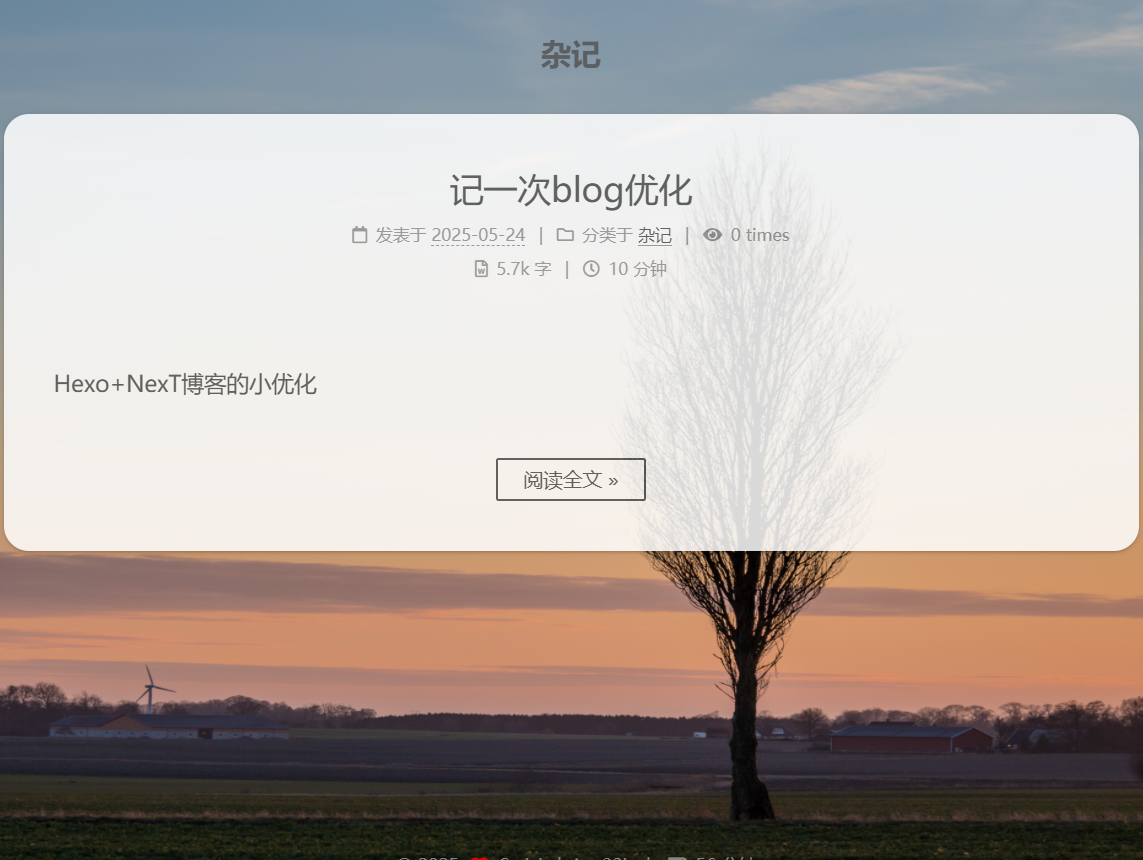
点击更多文章后的文章列表实现
这部分主要基于原来的Index.swig,因为我觉得原来的风格就挺简洁好看的
找到themes/next/layout/category.swig,改成:
1
2
3
4
5
6
7
8
9
10
11
12
13
14
15
16
17
18
19
20
21
22
23
24
25
26
{% extends '_layout.swig' %}
{% import '_macro/sidebar.swig' as sidebar_template with context %}
{% block title %}
{{ page.category }} | {{ __('title.category') }} | {{ config.title }}
{%- if theme.index_with_subtitle and config.subtitle %} - {{ config.subtitle }}{%- endif %}
{% endblock %}
{% block class %}category posts-expand{% endblock %}
{% block content %}
<div class="category-title" style="text-align: center; margin: 30px 0;">//这里把分类名称置中了
<h1>{{ page.category }}</h1>
</div>
{%- for post in page.posts.toArray() %}
{{ partial('_macro/post.swig', {post: post, is_index: true}) }}
{%- endfor %}
{% include '_partials/pagination.swig' %}
{% endblock %}
{% block sidebar %}
{{ sidebar_template.render(false) }}
{% endblock %}效果:
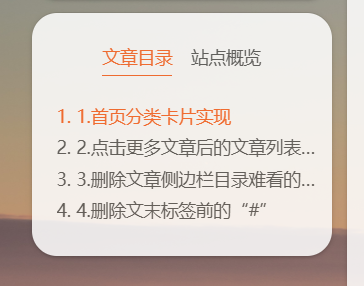
删除文章侧边栏目录难看的下划线
在themes/next/layout/_partials/head.swig最后加上:
1
2
3
4
5
6
7
8
9
10
11
12
13
14
15
16
17
18
19
20
<!-- 强制移除目录下划线 -->
<style>
/* 覆盖所有可能的目录容器 */
[class*="toc"] .nav-item a,
[class*="TOC"] .nav-item a,
.active > a,
.active-current > a {
border-bottom: none !important;
text-decoration: none !important;
box-shadow: none !important;
}
/* 覆盖伪元素下划线 */
[class*="toc"] a::after,
[class*="TOC"] a::after {
display: none !important;
}
</style>效果:
删除文末标签文字前的“#”
先说文件:themes/next/layout/_macro/post.swig
这个问题,网上找到的解决方法都是删掉11行的“#”
1
2
3
4
5
6
7
8
9
10
11
12
//这是原来的代码,可以ctrl+F搜post-footer
<footer class="post-footer">
{%- if post.tags and post.tags.length %}
{%- if theme.tag_icon %}
{%- set tag_indicate = '<i class="fa fa-tag"></i>' %}
{% else %}
{%- set tag_indicate = '#' %}
{%- endif %}
<div class="post-tags">
{%- for tag in post.tags.toArray() %}
<a href="{{ url_for(tag.path) }}" rel="tag">#<i class="fa fa-tag"></i>{{ tag_indicate }} {{ tag.name }}</a>
{%- endfor %}但是删除后发现“#”还在。把代码给DS看了下,发现第7行把tag_indicate设成了“#”,删掉这个就可以了
效果:

测试时阅读文章不计数
2025.6.2 注:在NexT8后的版本,valine不被支持了
博客搭起来后一直有个问题,就是自己看自己的博客文章会被计数,最开始是用ublock屏蔽统计网站来实现,但是这两天测试了一下发现这个方法用手机访问也不会计数,这不就意味着统计功能瘫痪了吗😮
所以开始和DS老师探讨新方法。DS老师这人不咋行,好方案藏着掖着,拷问了半天才有了下面的简洁的方法:
themes/next/layout/_third-party/comments/valine.swig中,在new Valine({ })的括号里,把visitor设置成
1
visitor : (window.location.hostname === 'localhost' || window.location.hostname === '127.0.0.1') ? false : {{ theme.valine.visitor }},这样子,在hexo s下访问localhost查看文章不会被计数。DS说这是把hexo s和hexo d两个环境隔离了,所以说如果hexo s下出现文章阅读数为零的情况算正常(我就是这样)
当然了,如果要看阅读数,就要访问hexo d部署后的网站了,记得不要点进文章去看,不然还是会被计数
麻烦是麻烦了点,但功能至少是实现了